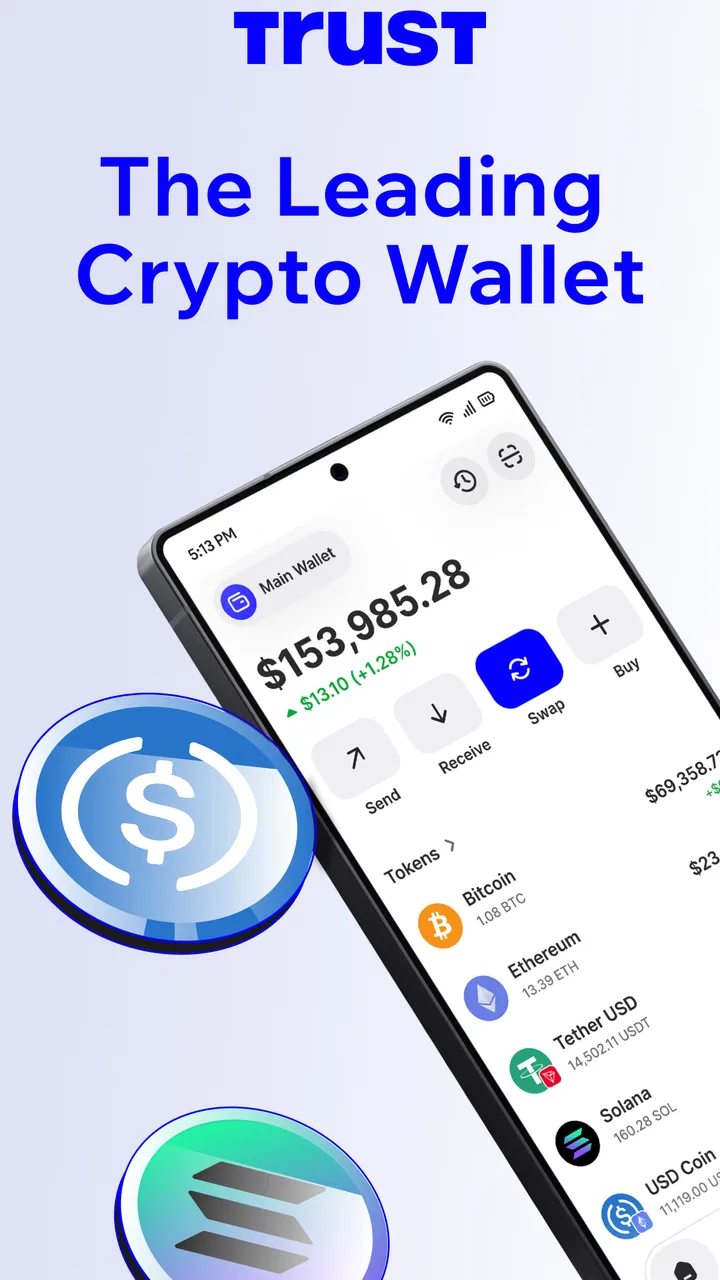
Trust: Crypto & Bitcoin Wallet
- 4.5
- Rating
- 50.00M
- Installs
- Free
- Price

 Analysis by App-foxy
Managing cryptocurrency from a phone can feel simple until a wallet asks you to move between networks, approve a transaction, or protect a recovery phrase. I spent time looking at Trust: Crypto & Bitcoin Wallet from that practical angle: not just whether it can hold digital assets, but whether its screens and workflows are understandable when the user is in a hurry, using a smaller display, or dealing with a noisy and distracting environment. My overall impression is that it is a capable self-custody finance app, but it also places serious responsibility on the person using it.
Trust: Crypto & Bitcoin Wallet is free, aimed at Everyone, and developed by DApps Platform, Inc. It is available as an Android app with a minimum operating system requirement of 9, and its current version is 8.88.0. The app belongs to the finance category rather than being a simple price tracker: its purpose is to let people manage supported digital assets, buy, sell, swap, and explore earning options while keeping control of their wallet credentials.
That combination explains both its appeal and its challenge. A beginner may appreciate having several crypto tasks in one place, while an experienced user may value the flexibility of a multi-chain wallet. At the same time, self-custody means that a wrong tap, a misunderstood network choice, or a lost recovery phrase can have consequences that a conventional banking app usually prevents through account recovery and customer support.
You May Also Like

 Google Keep - Notes and lists
Google Keep’s Quiet Growth Shows the Appeal of Simpler Notes
As mobile work gets busier, Google Keep keeps winning a simple contest: capture a thought quickly, find it later, and get on with the day.

 Blood Strike: 2.5 Anniversary
Blood Strike’s Loadouts Turn Every Drop Into a Tactical Gamble
A close look at Blood Strike’s custom loadouts: how fast access to signature weapons reshapes its battle royale rhythm, rewards preparation, and narrows the gap between fights.

 Pandora - Music & Podcasts
Pandora’s Music Is Easy to Start, but Harder to Recover
Pandora’s strength is its low-effort path from a seed to a station. Its weak spot is how much confidence it asks you to place in connection, setup, and quiet recovery.

 8 Ball Pool
8 Ball Pool Is Built on Rivalries, Rematches, and Routine
A close look at the rivalries, rematches, shared routines, and unanswered safety questions that turn a quick pool match into a persistent mobile community.

 Samsung Music
Samsung Music’s Quiet Strength Is Playing What You Already Own
Its reach comes less from spectacle than from dependable access to a personal library. That simplicity is both the app’s strongest retention engine and its ceiling.

 AccuWeather: Weather Radar
AccuWeather Review: A Quick, Clear Forecast for Everyday Decisions
For everyday plans, the best forecast is the one you can understand quickly. AccuWeather makes rain timing, radar, and local conditions easy to act on, with a few trade-offs.
More From Our News Desk



How the app feels to read and navigate
The first useful quality is that the main purpose is easy to identify. A wallet should quickly answer three questions: what do I own, what can I do with it, and where do I go next? Trust generally organizes the experience around those actions rather than burying them inside a long settings menu. For someone checking a balance or starting a transfer, that direct approach is more comfortable than navigating through a general-purpose finance platform with crypto features added as an afterthought.
In my experience, the most important readability issue is not the amount of text. It is the density of financial information. Asset names, symbols, balances, network choices, estimated values, and transaction details can appear close together. A user who reads quickly may understand the broad screen but miss a small distinction between an asset and the network used to send it. I would slow down at every confirmation screen, especially when the transfer involves a token that exists on more than one chain.
The app is easier to approach when I treat each screen as a checklist instead of tapping through it automatically. Before confirming a transaction, I look for the asset, amount, destination, network, and fee. That habit is more valuable than simply knowing where the buttons are. It also helps users who need extra time to process information, because the workflow becomes a repeatable routine rather than a memory test.
Trust’s broad feature set can make the interface feel busier than a wallet designed only for receiving and sending one type of cryptocurrency. Buying, swapping, and earning are useful additions, but each activity introduces its own terminology and risk. A new user may reasonably wonder whether a button is moving funds, exchanging them, or connecting to another service. I recommend exploring with a very small amount first and reading the confirmation language instead of assuming that every action works like a bank transfer.
Making everyday checks less tiring
A realistic use case is a person checking a payment while commuting. They open the wallet, glance at the portfolio, and need to decide whether an incoming transaction has arrived. That is a poor moment for detailed decision-making: the screen may be moving, glare may reduce contrast, and attention may be divided. Trust is most useful in that situation for checking information, not for rushing into a swap or sending funds.
For regular use, I would keep a personal naming and checking routine outside the app. I might write down which network a recipient expects, verify the first and last characters of an address, and only then open the send flow. This is not a Trust-specific setting; it is a practical safeguard for a wallet where the user is responsible for the final approval. The app can present the transaction, but it cannot replace careful reading.
The large user base suggests that the product has broad appeal: it has passed fifty million installs, with an average rating of 4.5 from around two and a half million ratings. Those figures show that many people find the general experience workable, but they do not tell me whether it suits a particular reading speed, motor ability, or level of crypto knowledge. I would use them as evidence of maturity, not as a substitute for testing the interface personally.
Motor, sensory, and situational considerations
For users with limited fine-motor control, the most important question is whether they can pause before an irreversible action. A wallet is not like a media app where an accidental tap is usually harmless. Sending assets, approving a swap, or accepting a fee requires deliberate interaction. I found that the safest approach is to separate browsing from transacting: review balances when relaxed, then return to the action only when the phone is stable and both hands are available if needed.
Users with tremors or reduced precision may find small address text and closely spaced controls demanding. Copying an address can be safer than manually typing it, but copied text still needs verification because a clipboard mistake or selecting the wrong contact can lead to a serious error. I would not rely on visual similarity alone. Reading the beginning and end of an address, checking the intended network, and confirming the amount are worthwhile pauses.
For people with low vision, the practical issue is information hierarchy. A balance may be easy to spot while a fee, network label, or warning is less prominent. Increasing the phone’s text size or display scaling can help, although it may also cause more content to fit less comfortably on the screen. I would test the full send and swap process with a tiny amount before depending on the app for larger transactions. The goal is not merely to make the home screen readable; every confirmation step must remain understandable.
Color-dependent interpretation is another area where I would be cautious. Financial interfaces often use visual changes to distinguish gains, losses, warnings, or completed actions. If a user has color-vision differences, the surrounding labels and numbers should carry the meaning, but I would still verify the exact wording rather than trusting color alone. A completed-looking screen is not enough evidence that a transfer has settled, and a favorable price display does not remove the need to inspect the transaction details.
For users with hearing loss, sound is not something I would depend on for confirmation. The important information needs to be visible in the app, and I would keep notifications as a convenience rather than treating them as proof that funds have arrived. Conversely, people with attention difficulties may benefit from turning a transaction into short stages: identify the asset, choose the network, enter the amount, inspect the destination, and confirm the fee. Doing one stage at a time reduces the temptation to skim.
Situational access matters even for people without a permanent disability. Bright sunlight, one-handed use, poor connectivity, fatigue, and interruptions can all make a financial action harder. I would avoid sending funds from a moving vehicle, crowded queue, or public place where someone can see the screen. A wallet’s flexibility is valuable, but mobile convenience should not be confused with a reason to make high-stakes decisions casually.
Where Trust fits beside other wallet choices
Compared with leaving cryptocurrency on an exchange, Trust gives the user a more direct self-custody experience. That can be empowering for someone who wants control over wallet access, but it also removes some of the recovery expectations people bring from ordinary financial apps. An exchange may feel easier for account recovery and trading records, while a self-custody wallet is better suited to people who understand that the recovery phrase is the key to the funds.
Compared with a single-network wallet, Trust’s multi-chain approach is more versatile. I can see why that appeals to users who hold different assets or want one app for several activities. The trade-off is cognitive load. More networks mean more chances to confuse a token with its chain or select an incompatible destination. If I only needed one narrow crypto task, a simpler specialist wallet could be easier to learn and less tiring to operate.
Compared with a hardware wallet, Trust is more convenient for everyday mobile access but does not offer the same separation from the phone itself. I would consider the app suitable for modest, active-use funds when I understand the security responsibilities. For larger long-term holdings, a different setup may make more sense, particularly for someone who wants an additional physical approval step and is comfortable with the extra process.
Useful workflows beyond the first launch
One non-obvious strength is the ability to use the wallet as a learning environment without committing to a complicated setup immediately. I can inspect how assets, swaps, and earning-related choices are presented before deciding what I actually need. That makes it useful for comparing workflows, provided I do not interpret an available option as a recommendation to use it.
A second practical insight is to separate portfolio visibility from transaction authority. I would use the app for checking holdings and preparing information, but I would not approve a transaction merely because the route looks familiar. This distinction is especially helpful for a family member who asks for assistance: I can explain where the details appear without taking responsibility for entering or confirming their recovery information.
A third trade-off concerns network selection. A cheaper-looking route is not automatically the right route if the recipient cannot receive that network. Before sending, I would ask the recipient which asset and network they support, then compare that answer with the options shown in Trust. This simple conversation prevents a common mistake that no amount of attractive interface design can fully solve.
The recovery phrase deserves its own rule. I would never store it in a screenshot, ordinary notes app, email draft, or message thread. I would also avoid entering it anywhere except the wallet’s legitimate recovery flow. Anyone who cannot keep that phrase private and available should skip self-custody, regardless of how polished the app feels. In that situation, a regulated service with account recovery may be a better match, even if it offers less direct control.
Remaining barriers and who should choose it
Trust is not the right choice for someone seeking a conventional bank-like experience. There is no comfort in assuming that a mistaken address can simply be corrected later. The user needs patience, basic understanding of digital assets, and a willingness to verify details. Someone who wants automatic tax organization, familiar bank transfers, or a single place to resolve every transaction problem may prefer a different financial service.
It may also be a poor fit for users who struggle to read dense transaction information on a phone and do not have another way to enlarge or review it. The app can bring many functions together, but that convenience increases the number of decisions presented. If a user needs a very minimal interface, a narrower wallet or a hardware-based arrangement may reduce confusion, even at the cost of convenience.
For beginners, I would start with receiving a small test amount, learning how the asset and network are displayed, and only then attempting a small send. I would not begin with a swap or earning feature simply because it is visible. Those options can be useful, but they require understanding what is being exchanged, what fees apply, and what risks accompany the action. The safest first experience is deliberately boring.
The app is free, which removes a purchase barrier, but free access does not mean that every transaction or third-party activity is costless. Users should inspect the final transaction information before confirming and understand that network conditions can affect the practical result. I would judge the wallet by the clarity of those decisions, not by the absence of an upfront price.
Its age rating of Everyone makes it broadly approachable, but that should not be confused with suitability for every level of financial maturity. Cryptocurrency is a high-responsibility subject even when the interface looks friendly. A younger or inexperienced user should have guidance from someone who understands recovery phrases, addresses, networks, and irreversible transfers.
After using it as a finance tool rather than a quick trading toy, I see the strongest case for people who want one mobile, multi-chain wallet and are prepared to learn the basics of self-custody. The weaker case is anyone who values maximum simplicity, assisted recovery, or a tightly controlled environment over flexibility. Trust can make several crypto tasks accessible from one place, but the user still has to supply the caution that the app cannot provide.
My inclusive verdict is therefore measured. The interface is approachable enough for many users, and the broad feature set can reduce the need to juggle several crypto apps. Its practical accessibility improves when I use larger display settings, take transactions slowly, avoid relying on color or sound, and create a written verification routine. The most important accessibility feature here is time to review before approval.
Trust: Crypto & Bitcoin Wallet has earned a substantial audience, with over fifty million installs and around twenty-one thousand written reviews alongside its 4.5 average rating. I would recommend it to a careful user who wants mobile self-custody and is willing to verify every important detail. I would not recommend it to someone who wants cryptocurrency to behave exactly like ordinary online banking. The app opens the door to more control, but walking through that door responsibly requires clear reading, steady hands, and ownership of every decision.
FAQs for Trust: Crypto & Bitcoin Wallet
01What is Trust: Crypto & Bitcoin Wallet?
Trust: Crypto & Bitcoin Wallet is a secure, open-source app designed to store and manage a wide variety of cryptocurrencies. It provides users with a seamless way to buy, store, and exchange digital assets. With its easy-to-use interface, it supports Bitcoin, Ethereum, and numerous other altcoins.
02Is Trust Wallet safe for storing my cryptocurrencies?
Yes, Trust Wallet is considered highly secure for storing cryptocurrencies. It uses robust encryption and does not store your private keys on its servers. Instead, private keys are stored locally on your device, ensuring that you have full control over your funds.
03Can I buy cryptocurrencies directly through Trust Wallet?
Yes, Trust Wallet allows users to purchase cryptocurrencies directly within the app using a credit card. Thanks to its integration with third-party payment providers, you can easily buy Bitcoin, Ethereum, and other supported coins without leaving the app.
04Does Trust Wallet support NFTs?
Yes, Trust Wallet supports non-fungible tokens (NFTs) on various blockchains, including Ethereum and Binance Smart Chain. Users can store, view, and manage their NFT collection directly within the app, making it a versatile option for digital asset management.
05Is Trust Wallet free to use?
Trust Wallet is free to download and use. While the app itself does not charge fees for sending or receiving cryptocurrency, users might incur network fees, which are standard charges by the blockchain networks. These fees vary based on network congestion and other factors.
Pros
- Easy-to-use interface for beginners.
- Supports a wide range of cryptocurrencies.
- Integrated dApps browser for flexibility.
- Secure with biometric authentication.
- No account registration needed.
Cons
- Limited customer support options.
- Occasional syncing issues with certain coins.
- Advanced features may confuse beginners.
- No desktop version available.
- In-app purchases can be costly.

Trust: Crypto & Bitcoin Wallet
Gallery